Getting Started in Steel Crossfire
Your first match, faction pick, and early progression on Roblox.
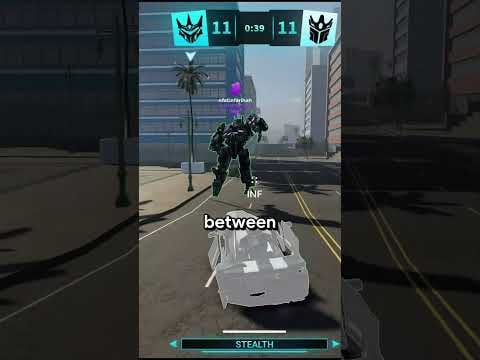
Welcome to Steel Crossfire, Marmot’s Oven’s transforming robot PvP on Roblox. If you have played third-person shooters before, you already understand aiming and cover—but transform combat adds a layer that punishes panic swaps and rewards players who plan form changes before they peek a lane. This guide gets you from the Roblox game page to a completed first match with Shards in your wallet and a robot you can confidently queue again.
Install and Launch
Open the official Roblox page for Steel Crossfire and click Play. On PC the Roblox client handles the download; on mobile or console follow the platform store flow. The experience requires an online connection—there is no offline practice mode at launch, so expect live teammates and enemies from minute one.
Create or sign into a Roblox account if needed. Age-appropriate chat settings apply; many players use Discord for team coordination instead of in-game text. Marmot’s Oven’s community Discord is the best place to find groups for Domination once you graduate from solo queue.
First Launch: What You See
The main menu typically offers play queues, robot selection, cosmetics, settings, and Battle Pass access. Season 1 is active— you will see pass tiers even before you understand every reward. Do not buy premium pass levels on day one; play a few TDM matches to see if you stick with the game.
Before queuing, open settings and skim control bindings. Steel Crossfire allows full remapping on supported devices. Cross-reference our Controls page so transform, ability, and aim buttons sit where you expect them. Fixing bindings now prevents bad habits later.
Picking Valorians or Reavers
Steel Crossfire splits players into Valorians and Reavers. Both sides access the same robots and transform rules at launch. Pick whichever side balances teams or matches your friends—there is no hidden “easy mode” faction.
You will spawn at your faction’s side of the map in Bot form. Learn that spawn’s exits: one route usually leads to mid control, another to a flank lane. Dying ten times from the same door means rotate through a different exit in Vehicle form instead of repeating the mistake.
Choosing Your First Robot
Launch roster characters include Pointrunner, Revv, Bastion, Centurion, Hardline, Beater, Grand Beater, and Super Centurion. You may not own every kit immediately—Shards and codes unlock more over time.
For your first sessions, pick a starter-rated robot from our Best Starters Tier List. Stable Bot gunfights teach fundamentals faster than high-skill Jets like Revv. Once you win a few aim duels, experiment with Vehicle-heavy picks such as Beater or Grand Beater.
Avoid spreading Shards across five robots in week one. Main one pick for ten matches, learn its transform rhythm, then branch out.
Understanding Bot, Vehicle, and Jet
Every fighter shares three forms:
- Bot — Grounded shooter form. Best for learning recoil, abilities, and cover play.
- Vehicle — Faster movement, heavier presence on objectives, higher risk when focused.
- Jet — Aerial mobility for flanks, escapes, and vertical Domination contests.
You transform with a dedicated input—confirm yours on the Controls page. Transformations have timing windows; swapping in the open gets you killed. Read How to Transform after your first match for combo ideas.
Your First Match: Team Deathmatch
Queue Team Deathmatch before Domination. TDM teaches gunplay without simultaneous objective pressure. Follow teammates, shoot who they shoot, and stay in Bot until you understand TMD map geometry.
Simple first-match goals:
- Finish the game—partial matches still teach spawn timing.
- Land more assists than deaths, even if you rarely top frag.
- Transform once per life on purpose, not randomly mid-fight.
- Check the results screen for Shards earned.
When TDM feels readable, read How to Play Steel Crossfire for mode differences and scoring detail.
Redeem Codes Before You Grind
Promo codes grant free Shards and boosters. Visit Active Codes and redeem every working code in the in-game redeem menu before a long session. Five minutes of copy-paste can save hours of grinding—How to Get Shards explains redemption steps and stacking boosters safely.
Codes update when Marmot’s Oven announces milestones on social channels. Bookmark the codes page and recheck weekly.
Shards, Unlocks, and Battle Pass
Shards are the universal currency. You earn them from matches, codes, and events. Spend early Shards on a reliable main robot, not cosmetic bundles, unless a skin motivates you to play more.
Season 1 Battle Pass tracks parallel rewards—free and premium tiers unlock skins, emotes, and currency bundles. See Season 1 Battle Pass once you have ten matches under your belt and know you will keep playing this season.
Graduate to Domination
After several TDM games with positive or neutral K/D trends, queue Domination. Capture points replace pure kill chasing. Jets and Vehicles matter more; teams that ignore objectives lose while ahead on eliminations.
Study Domination Tips before your first Domination queue. Even one captured zone per life helps your team more than three kills on the wrong side of the map.
Common New Player Mistakes
- Transforming in open ground during a 1v2.
- Chasing kills while Domination points flip uncontested.
- Ignoring Controls remaps and blaming “bad default keys.”
- Buying premium Battle Pass before testing free rewards.
- Skipping Active Codes and grinding Shards the slow way.
Fix one mistake per session instead of overwhelming yourself with advanced tech.
Where to Go Next
You now know how to install, pick a faction, choose a starter robot, and finish a TDM match. Continue with How to Play for full mode rules, How to Transform for form mastery, and How to Get Shards to fund your roster efficiently.
Frequently Asked Questions
Quick answers to the most common Steel Crossfire questions.
Is Steel Crossfire free on Roblox?
Yes. The base game is free to play. Shards, Battle Pass tiers, and cosmetics progress through gameplay and optional purchases, but you can queue matches without paying.
What should I play first, TDM or Domination?
Start with Team Deathmatch. It teaches shooting and transforms without capture-point pressure. Move to Domination after you understand spawns and form swaps.
How do I redeem Steel Crossfire codes?
Copy codes from our Active Codes page, open the in-game redeem menu, paste each code, and claim Shards or boosters. Redeem before long sessions so boosters apply to full play blocks.
Which robot is best for absolute beginners?
Follow the Best Starters tier list for current meta picks. Stable Bot-focused robots teach aim fundamentals faster than high-mobility specialists.
Can I change controls on mobile?
Yes. Steel Crossfire supports customizable controls on supported platforms. Use our Controls guide to align transform and ability buttons with your grip.
Where do I get help from other players?
Join Marmot's Oven's official Discord for LFG groups, patch discussion, and code alerts. In-game team chat works for quick callouts during matches.